> For the complete documentation index, see [llms.txt](https://help.openloyalty.io/llms.txt). Markdown versions of documentation pages are available by appending `.md` to page URLs; this page is available as [Markdown](https://help.openloyalty.io/gamification/tiers/tiers-configuration.md).
# Tiers Configuration
In this section, you will learn how to configure Tiers.
## Tiers Configuration
In this section, you will learn how to configure the Tiers in your loyalty program.
### Conditions
Conditions determine how members move between tiers within a tier set. You can select up to 8 conditions per tier set and combine them as needed.
All selected conditions apply to every tier in the set. Threshold values for each condition and tier are defined during the tier creation step.
* **Active units** – Tier qualification is based on the current balance in the selected wallet.
* **Total earned units** – Tier qualification is based on the total number of units a member has earned in the selected wallet since joining the loyalty program.
* **Total spending** – Tier qualification is based on the total amount of money a member has spent since joining the loyalty program.
* **Months since joining the program** – Tier qualification is based on the number of full months since the member joined the loyalty program.
* **Cumulative earned units** – Tier qualification is based on the number of units earned within a defined period in the selected wallet. The count resets at the start of each recalculation period.
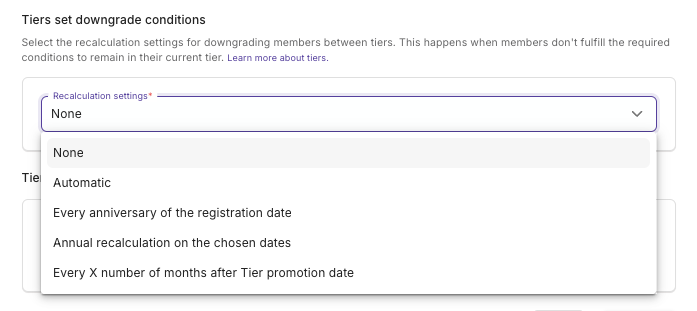
### Downgrade conditions
Downgrade conditions control when members are moved to a lower tier because they no longer meet the requirements of their current one.
* **None -** A member does not downgrade in Tiers level
* **Automatic -** Downgrade occurs automatically as soon as a member no longer meets the conditions for their current tier.
* **Every anniversary of the registration date -** Downgrade occurs annually on the anniversary of the member's registration date. A member who registered on 2020-10-10 is recalculated on 2025-10-10, then 2026-10-10, and so on.
* **Annual recalculation on the chosen dates -** You specify a list of dates on which downgrade occurs every year. If you add 03-10 and 07-15, downgrades happen annually on March 10 and July 15.
* E**very X number of months after Tier promotion date -** You set an interval in months, counted from the member's last tier promotion. With a promotion date of 2025-10-10 and an interval of 2 months, the downgrade date is 2025-12-10.
---
# Agent Instructions
This documentation is published with GitBook. GitBook is the documentation platform designed so that both humans and AI agents can read, navigate, and reason over technical content effectively. Learn more at gitbook.com.
## Querying This Documentation
If you need additional information that is not directly available in this page, you can query the documentation dynamically by asking a question.
Perform an HTTP GET request on the current page URL with the `ask` query parameter, and the optional `goal` query parameter:
```
GET https://help.openloyalty.io/gamification/tiers/tiers-configuration.md?ask=&goal=
```
`ask` is the immediate question: it should be specific, self-contained, and written in natural language.
`goal` is optional and describes the broader end goal you are ultimately trying to accomplish on behalf of the user. GitBook uses it to tailor the answer towards what is most useful for that goal.
The response will contain a direct answer to the question and relevant excerpts and sources from the documentation.
Use this mechanism when the answer is not explicitly present in the current page, you need clarification or additional context, or you want to retrieve related documentation sections.