> For the complete documentation index, see [llms.txt](https://help.openloyalty.io/llms.txt). Markdown versions of documentation pages are available by appending `.md` to page URLs; this page is available as [Markdown](https://help.openloyalty.io/implementation-guide/module-checklists/rewards-and-coupons.md).
# Rewards & Coupons
Building the rewards catalogue, letting members redeem coupons, vouchers and physical rewards, marking coupons as used and fulfilling orders — with the API calls, webhooks and checks for each step.
Rewards are what members spend their units on: coupon codes for your shop, third-party vouchers, physical merchandise, tickets. Open Loyalty holds the catalogue, checks balance, stock and limits, spends the units and issues the code; your channels show the catalogue and use the codes; your fulfilment process ships physical rewards.
For the Admin Panel side, see [Creating a reward](https://help.openloyalty.io/rewards-redemption/rewards/reward-list/creating-reward), [Reward types](https://help.openloyalty.io/rewards-redemption/rewards/reward-list/reward-types), [Adding coupons](https://help.openloyalty.io/rewards-redemption/rewards/reward-list/adding-coupons) and [Reward fulfillment](https://help.openloyalty.io/rewards-redemption/rewards/reward-fulfillment).
## Reward types
| Type (API) | Use for |
| ------------------- | ---------------------------------------------------------------------------------------------------------------------------------- |
| `static_coupon` | A code with a fixed value — your own codes (uploaded) or generated ones |
| `dynamic_coupon` | A code whose value is set when it's issued |
| `conversion_coupon` | Units converted to money at a rate (e.g. 100 points = 1 €) |
| `material` | Physical merchandise that has to be shipped |
| `fortune_wheel` | A spin or lottery draw — see [Fortune wheels & lotteries](/implementation-guide/module-checklists/fortune-wheels-and-lotteries.md) |
## Who does what
| Area | Responsibility |
| ------------------------------ | ------------------------------------------------------------------------------------------------ |
| **Admin Panel** | Rewards, categories, costs, stock, per-member limits, visibility, coupon code pools |
| **Integration layer** | Lists rewards for the member, buys them, marks coupons used or unused, updates fulfilment status |
| **Website / app** | Catalogue with categories, "redeem" flow, "my rewards" with codes |
| **E-commerce platform / POS** | Accepts the codes at checkout and reports when one is used |
| **Fulfilment / warehouse** | Ships physical rewards and reports status |
| **CRM / marketing automation** | Sends the voucher with its code and status updates |
## Design decisions
| Decision | Options | Recommendation |
| --------------------- | ----------------------------------------------------- | --------------------------------------------------------------------------------------------------------------------------------- |
| Where codes come from | Uploaded from your shop, or generated by Open Loyalty | Upload codes your shop already validates; generate them if the shop can accept Open Loyalty's codes. |
| Stock | Limited by quantity, by uploaded codes, or unlimited | Set stock for physical rewards. A coupon with uploaded codes is limited by the codes themselves — set a per-member limit as well. |
| Who sees what | Everyone, segments, tiers, labels | Use visibility and labels for audience-specific rewards (e.g. a tier-only catalogue, or rewards that need a verified profile). |
| Coupon use | Report usage back, or not | Report it (`reward/redeem`) so members and support see which codes are used, and so reporting is complete. |
| Cancellations | Allowed, or not | Allow cancelling unused rewards — but cancelling doesn't return units, so refund them explicitly. |
## Recommended flow
{% stepper %}
{% step %}
### Configure (Admin Panel)
Create [categories](https://help.openloyalty.io/rewards-redemption/rewards/reward-categories) for the catalogue tabs, then the rewards with cost, wallet, stock, limits and visibility. Upload or generate coupon codes (`POST /api/{storeCode}/reward/{reward}/coupon`).
{% endstep %}
{% step %}
### Show the catalogue
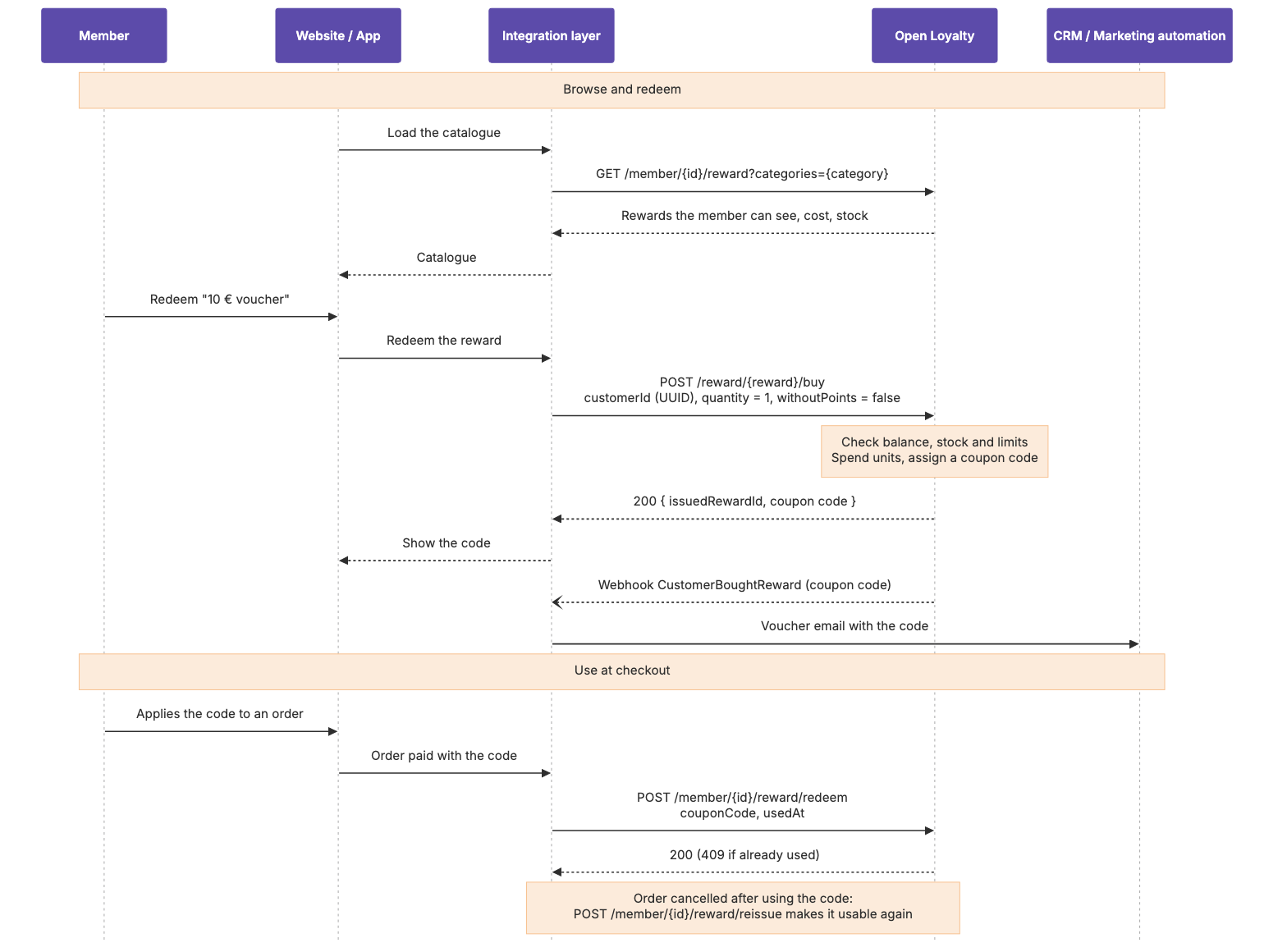
`GET /api/{storeCode}/member/{member}/reward` returns the rewards this member can see, with cost; filter by `categories` for tabs and by label if several brands share a tenant. Leave spins out of the catalogue with `type[notIn]=fortune_wheel` if they're shown elsewhere.
{% endstep %}
{% step %}
### Redeem
`POST /api/{storeCode}/reward/{reward}/buy` with the member's **`customerId`** (UUID — not the loyalty card number), `quantity` and `withoutPoints = false`; add `shippingAddress` for physical rewards. Open Loyalty checks balance, stock and limits, spends the units and returns the issued reward with its coupon code.
{% endstep %}
{% step %}
### Use and reissue coupons
When the shop accepts a code, call `POST /api/{storeCode}/member/{member}/reward/redeem` with the `couponCode` (and `usedAt` for the real time); a `409` means it's already used. If the order is cancelled and the code should work again, call `POST /api/{storeCode}/member/{member}/reward/reissue`.
{% endstep %}
{% step %}
### Fulfil physical rewards
Pass new orders to fulfilment from the `CustomerBoughtReward` webhook, and update their status with `POST /api/{storeCode}/redemption/{issuedReward}/status` (or `/redemption/status/bulk`, or a [mass status import](https://help.openloyalty.io/rewards-redemption/rewards/reward-fulfillment/mass-reward-status-change)).
{% endstep %}
{% step %}
### Cancel when needed
`POST /api/{storeCode}/redemption/{issuedReward}/cancel` cancels an unused reward and restores limits; an uploaded code goes back to the pool, a generated one is deleted. **Units aren't returned** — refund them with `POST /api/{storeCode}/points/add` if the member should get them back. See [Canceling a redeemed reward](https://help.openloyalty.io/rewards-redemption/rewards/reward-fulfillment/canceling-redeemed-reward).
{% endstep %}
{% endstepper %}
## Sequence diagrams
Coupon: redeem, use and reissue
Physical reward fulfilment
## Go-live checklist
### Admin Panel
* [ ] Every reward has the right cost, wallet, category, stock, per-member limit and visibility.
* [ ] Coupon pools have enough codes for the expected launch demand.
* [ ] Restricted rewards are hidden from members who aren't eligible.
### Integration layer
* [ ] Redemptions send the member's `customerId` (UUID).
* [ ] Coupon use is reported with `reward/redeem`; `409` is handled as already used.
* [ ] Cancellations refund units explicitly where the member should get them back.
* [ ] Physical rewards reach fulfilment and their status is updated.
### Website / app and shop
* [ ] The catalogue shows cost, availability and out-of-stock state.
* [ ] "My rewards" shows codes and their status.
* [ ] The shop accepts issued codes and rejects used ones.
### Validation
* [ ] Redeem with too few units, out of stock, and over the per-member limit: each is refused with a clear message.
* [ ] A code is accepted once at checkout and then shows as used.
* [ ] Cancel a redemption: the code returns to the pool and the refund (if intended) arrives.
## Key endpoints
* `GET /api/{storeCode}/member/{member}/reward` — [Get available rewards to a member list](https://help.openloyalty.io/api-reference/reward/get-available-rewards-to-a-member-list)
* `POST /api/{storeCode}/reward/{reward}/buy` — [Buy a reward](https://help.openloyalty.io/api-reference/reward/buy-a-reward)
* `POST /api/{storeCode}/member/{member}/reward/redeem` — [Mark coupon as used](https://help.openloyalty.io/api-reference/member/mark-coupon-as-used)
* `POST /api/{storeCode}/member/{member}/reward/reissue` — [Mark coupon as unused](https://help.openloyalty.io/api-reference/member/mark-coupon-as-unused)
* `GET /api/{storeCode}/redemption` — [Get redeemed rewards list](https://help.openloyalty.io/api-reference/reward/get-redeemed-rewards-list), e.g. `customerData:loyaltyCardNumber=` for "my rewards"
* `POST /api/{storeCode}/redemption/{issuedReward}/status` — [Change redeemed reward's status](https://help.openloyalty.io/api-reference/reward/change-redeemed-rewards-status), and [in bulk](https://help.openloyalty.io/api-reference/reward/bulk-change-redeemed-rewards-status)
* `POST /api/{storeCode}/redemption/{issuedReward}/cancel` — [Cancel redeemed reward](https://help.openloyalty.io/api-reference/reward/cancel-redeemed-reward)
* `POST /api/{storeCode}/reward/{reward}/coupon` — [Add coupon list to the reward](https://help.openloyalty.io/api-reference/reward/add-coupon-list-to-the-reward)
**Webhooks:** [CustomerBoughtReward](https://apidocs.openloyalty.io/#tag/Webhook-event/operation/CustomerBoughtReward), [RewardRedemptionStatusChanged](https://apidocs.openloyalty.io/#tag/Webhook-event/operation/RewardRedemptionStatusChanged), [CouponWillExpire](https://apidocs.openloyalty.io/#tag/Webhook-event/operation/CouponWillExpire)
{% hint style="warning" %}
**Common pitfalls**
* Sending the loyalty card number to `reward/buy` — it needs the `customerId` UUID.
* Never reporting coupon use: members see used codes as available, and reports are incomplete.
* Cancelling a redemption and assuming the units came back.
* Running out of uploaded codes during a launch.
{% endhint %}
---
# Agent Instructions
This documentation is published with GitBook. GitBook is the documentation platform designed so that both humans and AI agents can read, navigate, and reason over technical content effectively. Learn more at gitbook.com.
## Querying This Documentation
If you need additional information that is not directly available in this page, you can query the documentation by asking a question.
Perform an HTTP GET request on the following URL with the `ask` and `goal` query parameters:
```
GET https://help.openloyalty.io/implementation-guide/module-checklists/rewards-and-coupons.md?ask=&goal=
```
`ask` is the immediate question: it should be specific, self-contained, and written in natural language.
`goal` is what the user is ultimately trying to achieve, the reason they need the answer. Sharing it helps GitBook give you a better, more relevant answer. A goal is most helpful when it describes the outcome the user wants rather than restating the question. For example, with `ask=how do I create an API token`, a goal like `automate deployments from our CI pipeline` lets GitBook tailor the answer to that use case.
The response will contain a direct answer to the question and relevant excerpts and sources from the documentation.
Use this mechanism when the answer is not explicitly present in the current page, you need clarification or additional context, or you want to retrieve related documentation sections.