> For the complete documentation index, see [llms.txt](https://help.openloyalty.io/llms.txt). Markdown versions of documentation pages are available by appending `.md` to page URLs; this page is available as [Markdown](https://help.openloyalty.io/integrations-and-data-exchange/product-catalog/product-analytics.md).
# Product Analytics
See how your products perform in the loyalty program — revenue, items sold, the cost of the points awarded for them, and the margin after loyalty.
Product analytics shows how your products perform in the loyalty program: **revenue**, **items sold**, the **loyalty cost** of the points awarded for them, and the **margin after loyalty**. It combines your transactions, your [Product Catalog](/integrations-and-data-exchange/product-catalog.md) and the [cost per unit](/members-and-activity/wallets/wallet-types-and-configuration.md#cost-per-unit) you set for each wallet — so you can see which products earn money once the loyalty program is accounted for, and which lose it.
***
## ✅ Before you start
| What | Why it matters |
| ------------------------------------------------- | ---------------------------------------------------------------------------------------------------------------------------------------------------------------------------------------------------------- |
| **Product catalog** | Name, category, brand and unit cost come from the catalog. Products outside it appear by SKU only, under **Not assigned**, with no margin. |
| **Unit cost** in the catalog (`unit_cost` column) | Needed for the gross margin. It is recorded on each sale when the transaction is registered. |
| **Cost per unit** on each wallet | Needed for the loyalty cost and the margin after loyalty. Without it, they are shown as unknown. See [Cost per unit](/members-and-activity/wallets/wallet-types-and-configuration.md#cost-per-unit). |
| **Campaign effects in Standard mode** | Attribute points precisely to the products they were earned on. See [Targets in effects](/campaigns/campaigns/campaigns-and-referral-campaigns/creating-campaigns/transaction-item-filters.md#in-effects). |
| **Permissions** | The role needs both **Product catalog** and **Home** (view). See [Who can see the analytics](#who-can-see-the-analytics). |
***
## 📊 Open the analytics
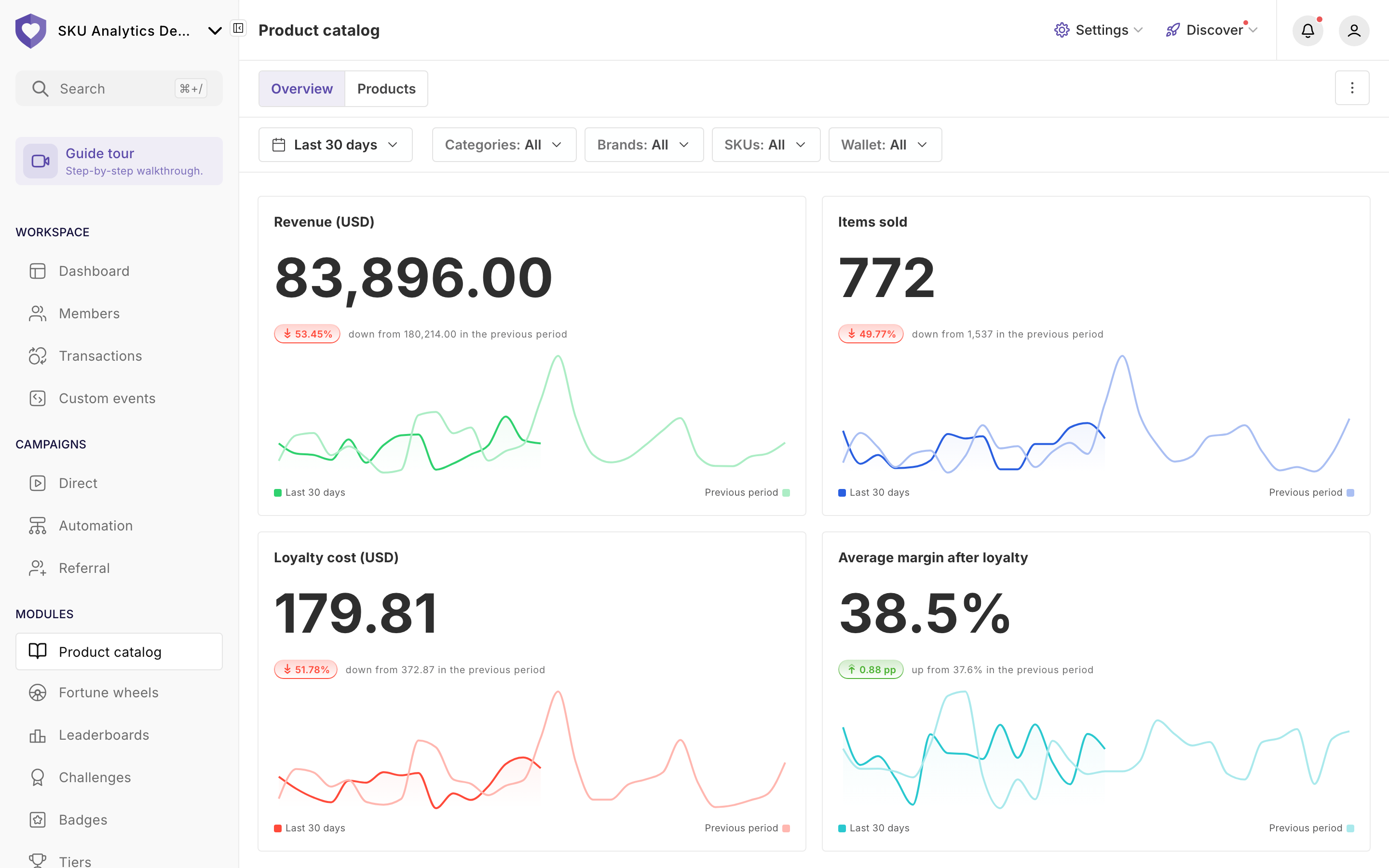
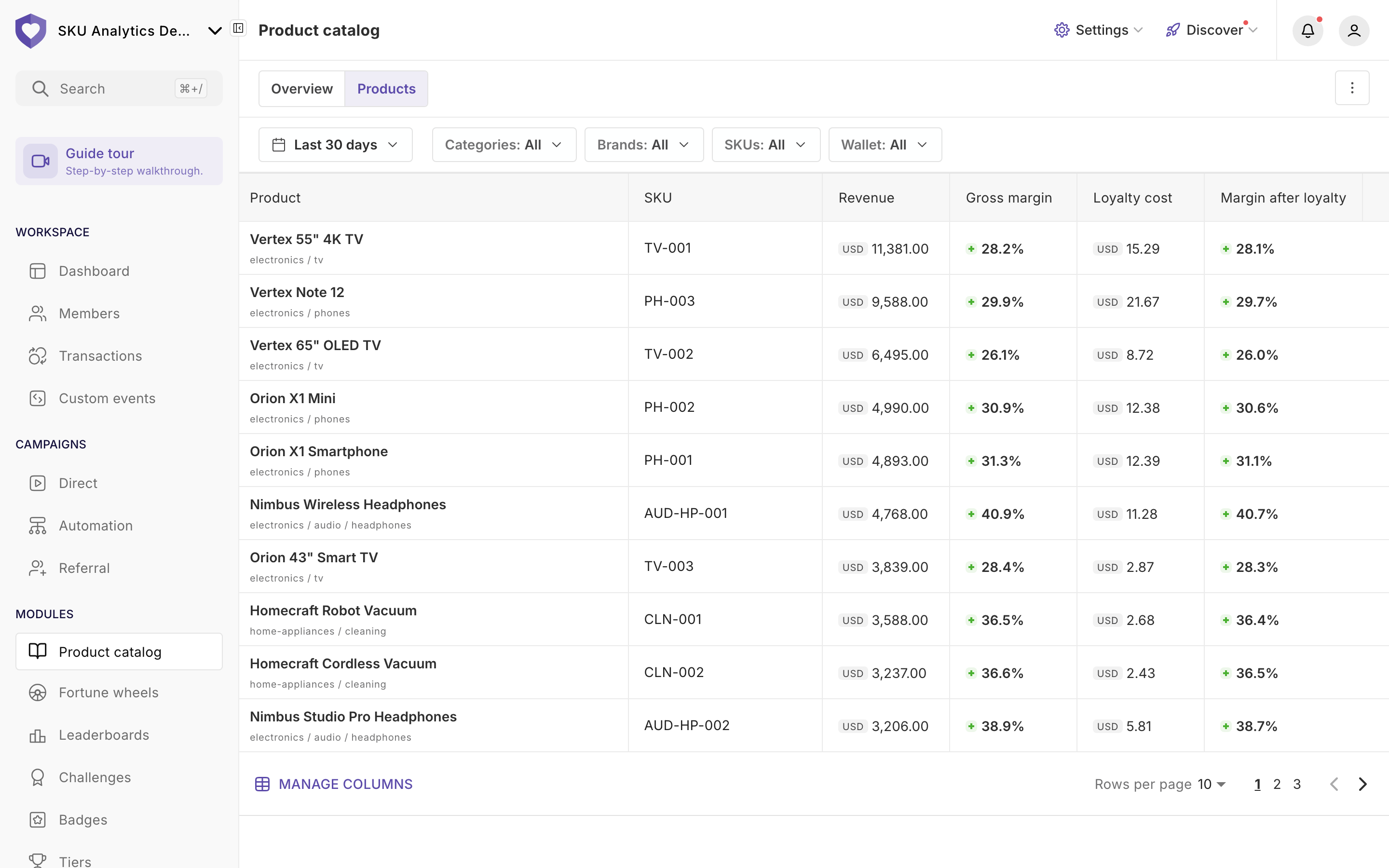
Go to **Modules → Product catalog**. The view has two tabs, **Overview** and **Products**. To manage the catalog itself (import, product list), open the **⋮** menu at the top right and choose **Manage Product catalog**.
### Filters
The filters at the top apply to both tabs:
* **Date range** — presets; by default the last 30 days, ending yesterday.
* **Categories** — the category tree. You can include a category and exclude selected subcategories.
* **Brands** and **SKUs** — multi-select with search.
* **Wallet** — one wallet, or all.
### Overview
* Four tiles, each with a trend and a comparison with the previous period: **Revenue**, **Items sold**, **Loyalty cost** and **Average margin after loyalty**.
* Tables: **Top products**, **Top categories**, **Top brands**, **Top channels**, **Top tiers** and **Top segments**.
### Products
A list of SKUs with **Product** (and its category path), **SKU**, **Revenue**, **Gross margin**, **Loyalty cost** and **Margin after loyalty**.
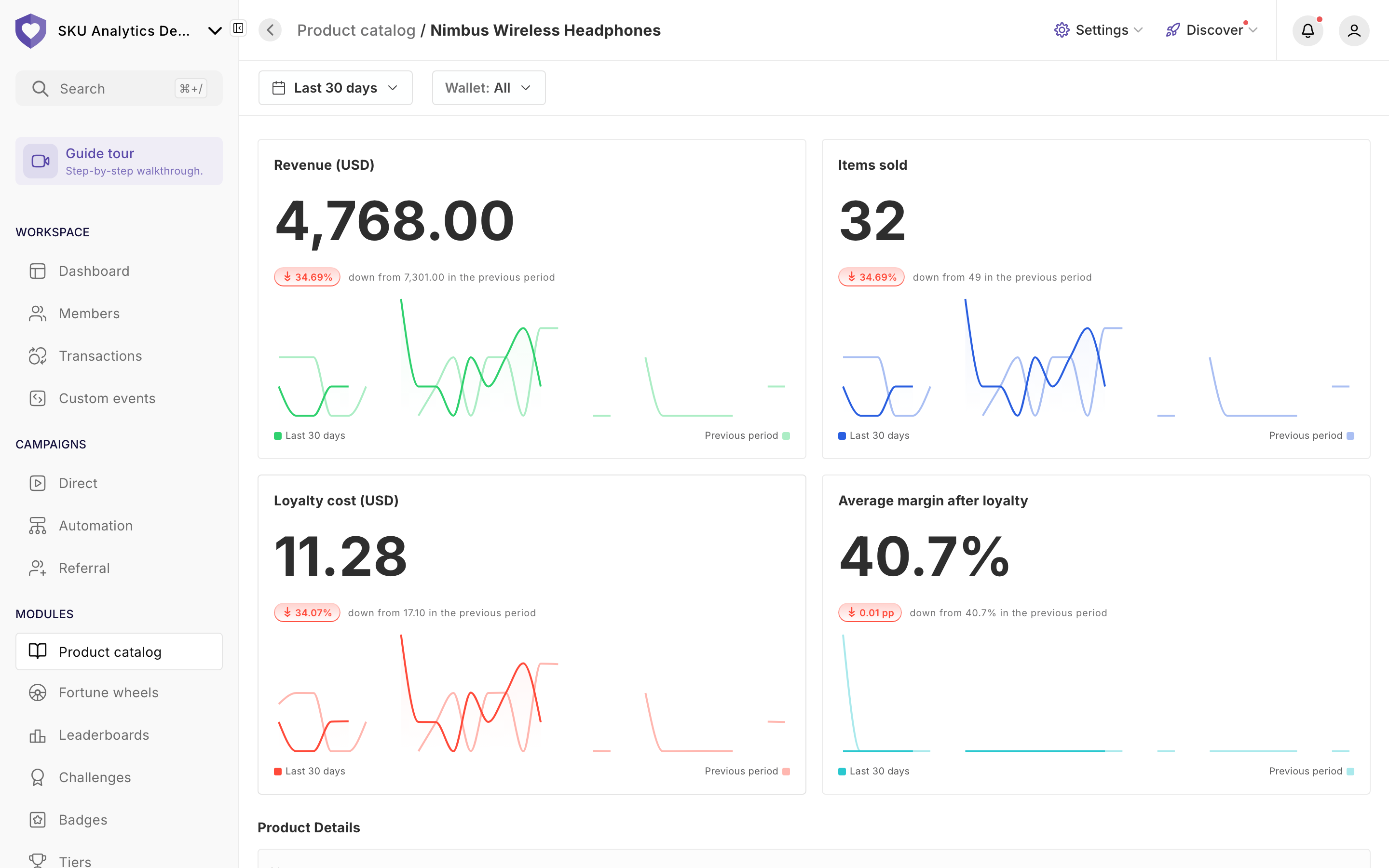
Click a product to open its details: four metric tiles, the product data from the catalog, and **Top segments**, **Top tiers** and **Top channels**. Product details have their own date range and wallet filters.
***
## 🧮 How the figures are calculated
| Figure | Calculation |
| ------------------------ | ------------------------------------------------------------------------------------------------ |
| **Loyalty cost** | Points attributed to the product × the wallet's cost per unit valid on the purchase date. |
| **Gross margin** | Revenue − product cost (the catalog unit cost recorded at the time of sale). |
| **Margin after loyalty** | Gross margin − loyalty cost. It can be negative when the points cost more than the gross margin. |
* Margin percentages are calculated from revenue. Product cost is kept with 2 decimal places, the cost per unit with 4.
* **Unknown instead of too high.** A margin is shown only when every sale in the row (a product, category, brand, channel or day in the date range) is fully costed. One sale without a product cost, or one awarded point without a cost per unit, leaves the margin of the whole row empty. The product cost is then the sum of the costed lines only.
* **Loyalty cost** is empty when some awarded points have no cost per unit for that day — one such wallet is enough. A loyalty cost of **0** means no points are linked to these sales: nothing was awarded, or the points were awarded before product analytics was available in your program.
* **Whole-receipt rewards** (a fixed amount, or a formula on the receipt value) are spread over every product on the receipt in proportion to line value — including products that didn't trigger the campaign. Effects with a custom expression are spread the same way. For precise attribution, use **Standard** mode with a target in **Applies to**.
* **Top tiers** and **Top segments** count a purchase once for each tier or segment the member held at the time of purchase, so rows can overlap. They can also add up to less than the total: sales without a member, by members with no tier or segment, or from before product analytics was available aren't in any row.
{% hint style="info" %}
**Changing the cost per unit recalculates history.** Each day is priced with the cost valid on that day, and the change appears after the next data refresh. A **unit cost** added to the catalog later, by contrast, applies to new sales only.
{% endhint %}
***
## 🔐 Who can see the analytics
* The analytics view needs both the **Product catalog** permission and **Home** (view) in the role editor.
* With **Product catalog** only, **Modules → Product catalog** opens catalog management instead — also when opening an analytics link directly.
* With **Home** only, **Product catalog** isn't shown in the menu.
* The filters (channels, campaigns, wallets) need no extra permissions.
* Viewing or editing the cost per unit needs the separate **Cost per unit** permission.
See [Available Permissions (ACL)](/administration/settings/roles/available-permissions-acl.md).
***
## ⚠️ Good to know
* Data is refreshed **once a day**, overnight; the last completed day is yesterday.
* Sales history (revenue, items sold, channel) covers your program's full transaction history. Category and brand from the current catalog are applied to past sales too, after the next refresh.
* Sales and points from before product analytics was available in your program have no product cost, no loyalty cost and no buyer details (tiers and segments).
* A product removed from the catalog keeps its last known name and category, and its past product costs stay.
* A receipt not linked to a member can be edited, and the edit re-reads the current catalog cost for that receipt. Receipts linked to a member can't be edited.
* The loyalty cost covers direct and referral campaigns. Points from challenges, leaderboards and fortune wheels aren't attributed to products.
* Only effects that grant units (points and other wallet types) are included; physical rewards aren't.
* Returns don't change the figures. The points of the original sale stay counted unless a return campaign cancels them.
---
# Agent Instructions
This documentation is published with GitBook. GitBook is the documentation platform designed so that both humans and AI agents can read, navigate, and reason over technical content effectively. Learn more at gitbook.com.
## Querying This Documentation
If you need additional information that is not directly available in this page, you can query the documentation by asking a question.
Perform an HTTP GET request on the following URL with the `ask` and `goal` query parameters:
```
GET https://help.openloyalty.io/integrations-and-data-exchange/product-catalog/product-analytics.md?ask=&goal=
```
`ask` is the immediate question: it should be specific, self-contained, and written in natural language.
`goal` is what the user is ultimately trying to achieve, the reason they need the answer. Sharing it helps GitBook give you a better, more relevant answer. A goal is most helpful when it describes the outcome the user wants rather than restating the question. For example, with `ask=how do I create an API token`, a goal like `automate deployments from our CI pipeline` lets GitBook tailor the answer to that use case.
The response will contain a direct answer to the question and relevant excerpts and sources from the documentation.
Use this mechanism when the answer is not explicitly present in the current page, you need clarification or additional context, or you want to retrieve related documentation sections.