> For the complete documentation index, see [llms.txt](https://help.openloyalty.io/llms.txt). Markdown versions of documentation pages are available by appending `.md` to page URLs; this page is available as [Markdown](https://help.openloyalty.io/playbook/sample-setups/sample-campaigns/11-refer-shopping-friends.md).
# #11 Refer Shopping Friends
Reward members with points and gifts when referred friends complete their first purchase.
{% hint style="info" icon="user-group" %}
### Business case
Referral campaigns turn existing members into program advocates.
Reward the referrer when a referred friend completes a first purchase. Use points for immediate value and a gift for stronger motivation.
**💡 Useful for** acquiring new customers while encouraging first transactions and boosting ACV.
{% endhint %}
{% hint style="warning" %}
This campaign involves these mechanics:
* [Referral campaigns](/campaigns/campaigns/campaigns-and-referral-campaigns/creating-campaigns/referral-campaign.md)
* [Purchase transaction triggers](/campaigns/campaigns/campaigns-and-referral-campaigns/creating-campaigns/trigger-types/purchase-transaction.md)
* [Rewards](/rewards-redemption/rewards/reward-list/creating-reward.md)
{% endhint %}
{% hint style="success" %}
Commonly used words in Referral Campaigns:
* **Referrer** – The member who invited a friend
* **Referee** – The friend who was invited
{% endhint %}
### 🛠️ Step by step
{% stepper %}
{% step %}
### Step 1: Campaign info
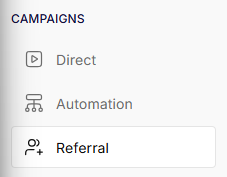
* **Path:** Campaigns > Referral > Add refferal campaign
* **Campaign trigger:** Purchase transaction
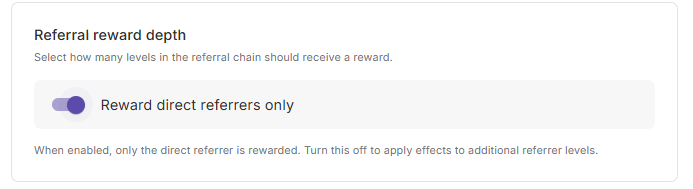
* **Referral reward depth**: Reward direct referrers only
Learn more about creating referral campaigns:
{% content-ref url="/pages/2TMM68lFVeTp1OgMW7Gf" %}
[Broken mention](broken://pages/2TMM68lFVeTp1OgMW7Gf)
{% endcontent-ref %}
{% endstep %}
{% step %}
### Step 2: Campaign info
* **Name:** Refer Shopping Friends
* **Start date:** Set your launch date
* **End date:** Optional
* **Status:** Active
{% endstep %}
{% step %}
### Step 3: Rules & Effects
* **Rules for referrer**
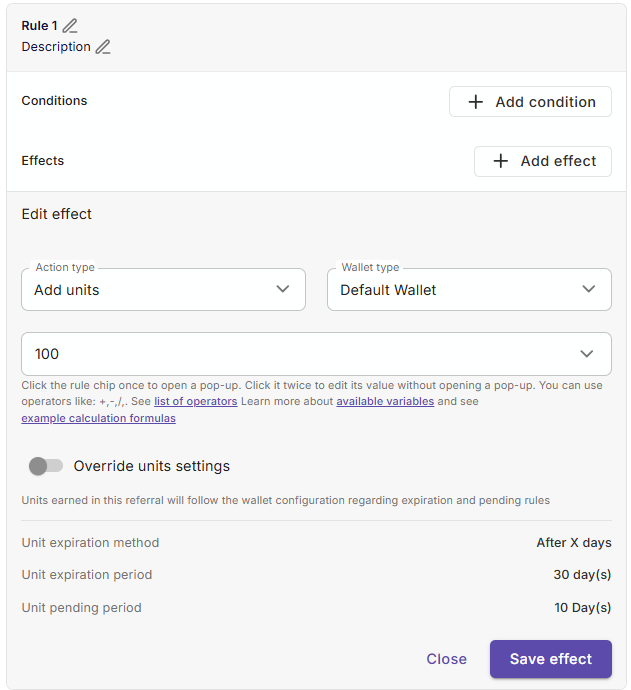
* **Rule 1:**
* **Conditions**: Empty
* **Effects**: Add Units, `Default Wallet` , `100`.
{% hint style="info" %}
**In plain English**
The referrer (the original member) will receive 100 points when the referee (the friend) makes a purchase.
{% endhint %}
**Rules for the referee**
* **Same as rule 1**
{% hint style="info" %}
**In plain English**
The referee (the friend) will also receive 100 points after completing a purchase.
{% endhint %}
{% endstep %}
{% step %}
### Step 4: Limitation & budget
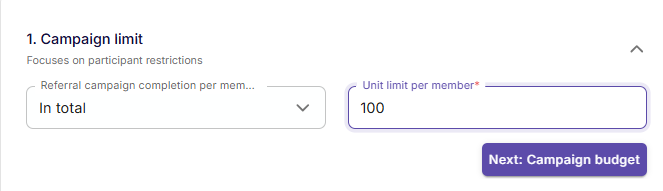
* **Campaign limit:** `In total`, `100`.
{% hint style="info" %}
**In plain English**
The campaign will only occur once, since each member will reach the limit of 100 points after just one occurence.
{% endhint %}
Using a per-member limit controls campaign cost and prevents misuse.
{% endstep %}
{% step %}
### Step 5: Review and save
Review the referral rules, rewards, and limits. Then save and activate the campaign.
{% endstep %}
{% endstepper %}
### Troubleshooting
#### The referrer did not receive points or a gift
Confirm that the referred member completed their first purchase. Check that the campaign is active and the referral relationship exists.
#### The reward is issued more often than expected
Set an **Effect application per member** limit. Ensure the referee condition matches only a first purchase.
#### The gift was not issued
Confirm that the selected reward is active and available. Check that its inventory or coupon pool has remaining stock.
---
# Agent Instructions
This documentation is published with GitBook. GitBook is the documentation platform designed so that both humans and AI agents can read, navigate, and reason over technical content effectively. Learn more at gitbook.com.
## Querying This Documentation
If you need additional information that is not directly available in this page, you can query the documentation dynamically by asking a question.
Perform an HTTP GET request on the following URL with the `ask` and `goal` query parameters:
```
GET https://help.openloyalty.io/playbook/sample-setups/sample-campaigns/11-refer-shopping-friends.md?ask=&goal=
```
`ask` is the immediate question: it should be specific, self-contained, and written in natural language.
`goal` is what the user is ultimately trying to achieve, the reason they need the answer. Sharing it helps GitBook give you a better, more relevant answer. A goal is most helpful when it describes the outcome the user wants rather than restating the question. For example, with `ask=how do I create an API token`, a goal like `build a script that syncs our docs to a CMS` lets GitBook tailor the answer to that use case.
The response will contain a direct answer to the question and relevant excerpts and sources from the documentation.
Use this mechanism when the answer is not explicitly present in the current page, you need clarification or additional context, or you want to retrieve related documentation sections.