> For the complete documentation index, see [llms.txt](https://help.openloyalty.io/llms.txt). Markdown versions of documentation pages are available by appending `.md` to page URLs; this page is available as [Markdown](https://help.openloyalty.io/sample-setups/sample-campaigns/2-earn-2x-points-when-shopping-on-monday-morning.md).
# #2 Earn 2x points when shopping on Monday morning
## **#2** Earn 2x points when shopping on Monday morning
**Business goals:**
* Number of transactions
* Customer Activation
**Loyalty mechanism:** Currency
**Description:**
* With this campaign, customers earn double the number of points when shopping in a specific period of time.
* The campaign helps activate members to start visiting the store at specific times e.g. hours, weekdays, or months.
* This type of campaign runs as an addition to the general spending rule e.g. Earn 1 point for every $1 spent. With the rule, we give additional points besides the normally earned loyalty currency.
**Default configuration:**
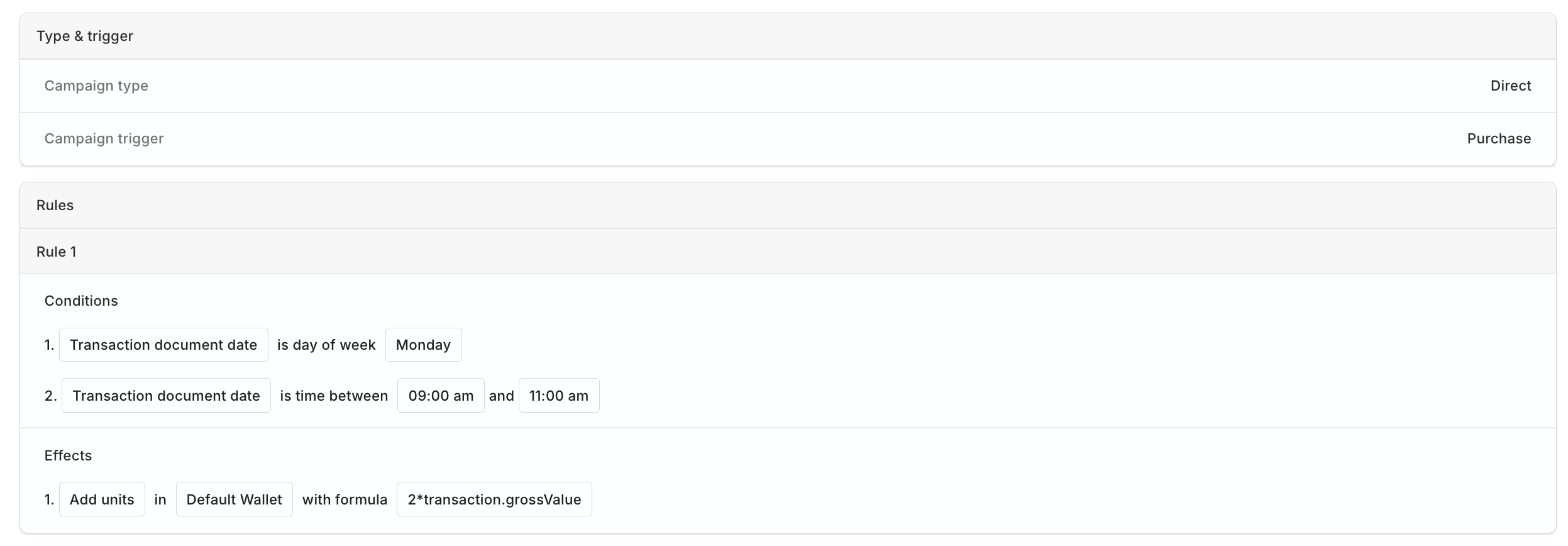
Campaign details overview
* **Campaign type:** Direct
* **Trigger:** Purchase transaction
* **Rules:**
* **Conditions:**
* The weekday in which the transaction was done is Monday *(Transaction document date -> Is the day of week -> Monday)*
* The hours between which the
transaction was done is 9:00 AM and 11:00 AM\
*(Time of transaction -> Is the time between -> From 9:00 AM To 11:00 AM)*
* **Effects:** Give 2 points for every $1 spent\
*(Add units -> Wallet type: Points wallet -> Calculation formula: 2\*transaction.grossValue)*
{% hint style="info" %}
**Actionable tips:**
* Adjust the time period to activate customers in the desired moments.
* Set up a daily or hourly limit to avoid fraud.
* Set up a budget for the total number of loyalty currency to control the costs of the campaign.
* Change the time period to a specific product category, and increase the sales of specific products e.g. Earn 2x points for buying product ACME.
* Target the rule for a specific tier or segment of customers to activate the desired group of customers.
{% endhint %}
### Campaign JSON file to import
{% file src="/files/1aWpvHFA99JB0iNEV5H9" %}
---
# Agent Instructions
This documentation is published with GitBook. GitBook is the documentation platform designed so that both humans and AI agents can read, navigate, and reason over technical content effectively. Learn more at gitbook.com.
## Querying This Documentation
If you need additional information that is not directly available in this page, you can query the documentation by asking a question.
Perform an HTTP GET request on the following URL with the `ask` and `goal` query parameters:
```
GET https://help.openloyalty.io/sample-setups/sample-campaigns/2-earn-2x-points-when-shopping-on-monday-morning.md?ask=&goal=
```
`ask` is the immediate question: it should be specific, self-contained, and written in natural language.
`goal` is what the user is ultimately trying to achieve, the reason they need the answer. Sharing it helps GitBook give you a better, more relevant answer. A goal is most helpful when it describes the outcome the user wants rather than restating the question. For example, with `ask=how do I create an API token`, a goal like `automate deployments from our CI pipeline` lets GitBook tailor the answer to that use case.
The response will contain a direct answer to the question and relevant excerpts and sources from the documentation.
Use this mechanism when the answer is not explicitly present in the current page, you need clarification or additional context, or you want to retrieve related documentation sections.